

Introduction
Many active traders face the same practical constraint: they cannot sit in front of charts all day watching multiple timeframes on EURUSD. Manual monitoring leads to missed setups, delayed entries, inconsistent rule application, and decision fatigue. When your strategy depends on multi-timeframe confirmation, the problem multiplies — higher-timeframe bias, intermediate structure, and lower-timeframe triggers all need attention at the right moment.
Automation becomes relevant when the core need is repeatable execution of rules without constant screen presence. An Expert Advisor on MT4 can handle scanning, signal logic, and order placement according to predefined parameters. The key is matching the EA to the actual problem rather than treating any bot as a universal fix.
CHOPPA Pro EA V16.0 MT4 from Yoforexea is positioned as one option for traders seeking automated multi-timeframe handling on EURUSD. It is not a guaranteed solution. It is a candidate worth evaluating if your primary bottleneck is time and consistency on that pair and approach.
Can CHOPPA Pro EA V16.0 Help Solve This Problem?
Yes, in a limited and specific way. CHOPPA Pro EA V16.0 is an MT4 Expert Advisor that works on EURUSD and supports multi-timeframe operation. It can take over the scanning and execution steps that normally require the trader to watch several timeframes simultaneously.
It addresses the monitoring and execution layer. It does not remove market risk, guarantee winning trades, or replace the need for proper risk settings and ongoing oversight. Traders who already have (or are willing to adopt) a multi-timeframe approach on EURUSD and want the rules applied automatically may find it relevant. Those seeking a fully hands-off “set and forget” profit machine will not.
How CHOPPA Pro EA V16.0 Addresses the Problem
- Continuous multi-timeframe chart watching → Automated scanning across timeframes → Reduced need to stay glued to the screen for EURUSD setups.
- Manual entry and exit timing → Rule-based order placement by the EA → More consistent application of the same criteria every time.
- Fatigue and missed opportunities during off-hours or busy periods → EA runs while the platform is connected → Better coverage of potential signals without personal presence.
These benefits only materialize if the EA’s internal logic matches the trader’s intended multi-timeframe rules and if the account, broker, and risk parameters are correctly configured. Automation changes the execution method; it does not change the underlying market risk.
Quick Buyer Snapshot
| Factor | Details |
|---|---|
| Platform | MT4 |
| Strategy | Check product specifications |
| Trading Style | Multi-timeframe automation |
| Pairs/Instruments | EURUSD |
| Timeframe | Multi-timeframe |
| Automation | Entry/exit execution support |
| Risk Management | Check product specifications |
| Configuration | Check product specifications |
| Best For | Traders short on monitoring time who want EURUSD multi-TF automation on MT4 |
Features That Actually Address the Problem
Focus stays on capabilities linked to the time and consistency problem:
- Multi-timeframe support on EURUSD → Allows the EA to consider conditions across timeframes instead of a single chart. Why it matters: reduces the need for the trader to switch charts constantly. What to verify: exact timeframes used and how confirmation is coded.
- Automated execution on MT4 → Places and manages trades according to its rules once attached and enabled. Why it matters: removes delayed or emotional manual clicks. What to verify: order types, slippage handling, and required account settings.
- Platform compatibility (MT4) → Runs inside the MetaTrader 4 environment most traders already use. Why it matters: lowers technical friction. What to verify: build number compatibility and any VPS recommendations.
Do not assume additional features such as specific indicators, grid logic, martingale, or proprietary filters exist unless confirmed in the official specifications.
Practical Buyer Use Case
A trader who works full-time cannot watch EURUSD across M15, H1, and H4 during London and New York sessions. They have a multi-timeframe bias-and-trigger approach but miss many signals because of work or sleep.
They obtain CHOPPA Pro EA V16.0, confirm it supports EURUSD multi-timeframe operation, install it on a demo MT4 account with a low-spread broker, load the documented settings (or conservative defaults), and let it run for several weeks. They review every trade for logic match, slippage, and drawdown behavior. Only after the results align with their risk tolerance and rule set do they consider a small live allocation. Monitoring continues even after going live.
No outcome is promised. The process simply tests whether the EA reduces the monitoring burden without introducing unacceptable risk.
Where CHOPPA Pro EA V16.0 May Help
- Freeing time previously spent switching between EURUSD timeframes.
- Applying the same multi-timeframe criteria more consistently than a tired human.
- Running during hours when the trader is unavailable.
- Providing a structured, configurable automation layer on MT4.
These are execution and time benefits only.
Where CHOPPA Pro EA V16.0 May Not Help
- Market risk remains fully intact. Losses can and will occur.
- Automation does not guarantee profits or positive expectancy.
- The internal strategy may not match every trader’s preferred multi-timeframe rules.
- Broker conditions (spreads, execution quality, commissions) still affect results.
- The EA may still require periodic monitoring, updates, and risk adjustments.
- Incompatible account types, leverage, or VPS setups can prevent proper operation.
- No EA replaces personal responsibility for position sizing and overall account risk.
Who Should Consider CHOPPA Pro EA V16.0?
- Traders with limited daily chart time who already focus on EURUSD.
- Those comfortable with multi-timeframe logic and willing to let an EA apply it.
- MT4 users who can run a reliable connection (local or VPS).
- Traders prepared to demo-test thoroughly and manage risk themselves.
- Intermediate users who understand that automation is a tool, not a substitute for process.
Who Should Avoid CHOPPA Pro EA V16.0?
- Anyone expecting guaranteed returns or “set and forget” passive income.
- Traders unwilling to test on demo first.
- Users whose strategy or preferred pairs differ from EURUSD multi-timeframe.
- Beginners who have never managed risk or run an EA.
- Those who cannot accept that drawdowns and losing periods are normal.
- Anyone whose broker or platform setup is incompatible.
Problem-Solution Comparison
| Trading Need | Manual Approach | CHOPPA Pro EA V16.0 |
|---|---|---|
| Monitoring | Constant multi-TF chart watching | Automated scanning on EURUSD |
| Execution | Manual order placement and management | Rule-based automated execution |
| Consistency | Subject to fatigue and missed signals | Same rules applied every time |
| Automation | None | Full EA automation on MT4 |
| Configuration | Trader adjusts manually each session | Settings loaded once (verify docs) |
| Human Intervention | High – continuous presence required | Lower – monitoring still advised |
What Should You Check Before Buying?
- Official confirmation of MT4 compatibility and required build.
- Exact multi-timeframe logic and supported timeframes.
- Confirmed EURUSD support (and any other pairs).
- Available risk parameters (lot sizing, stops, max drawdown controls).
- Documented recommended settings or set files.
- Broker requirements (ECN, low spread, etc.).
- VPS necessity and minimum specs.
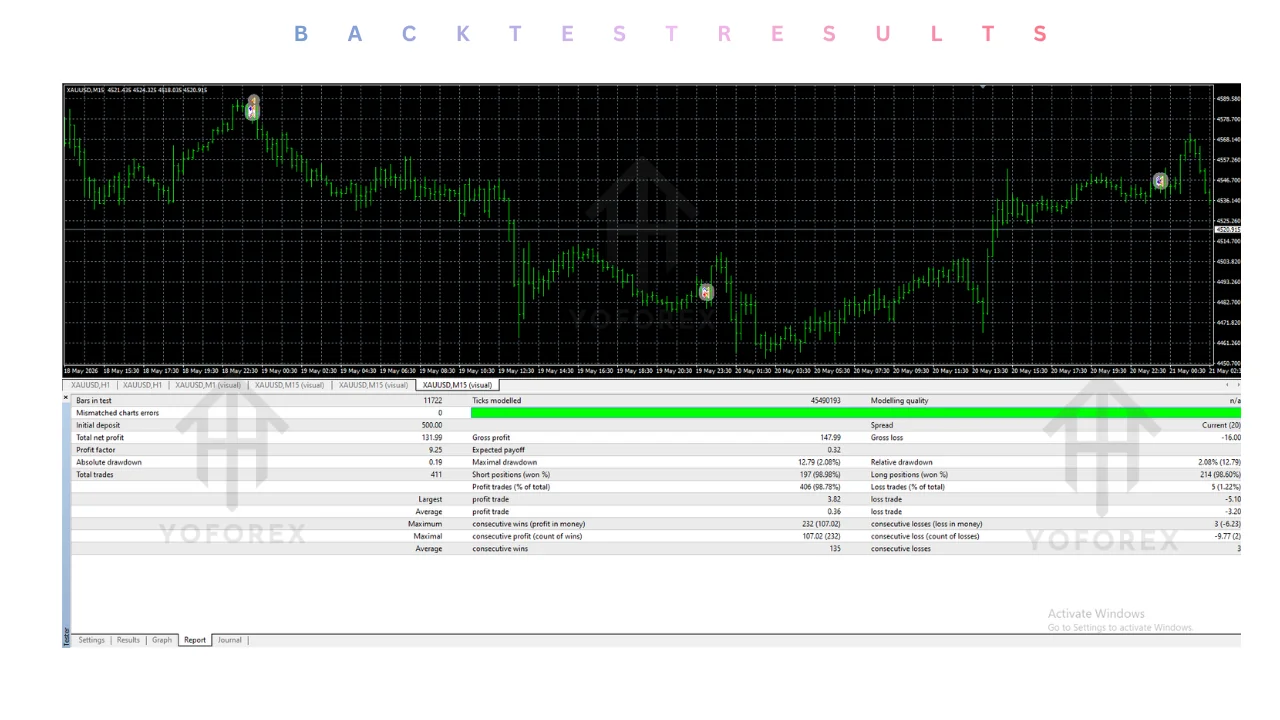
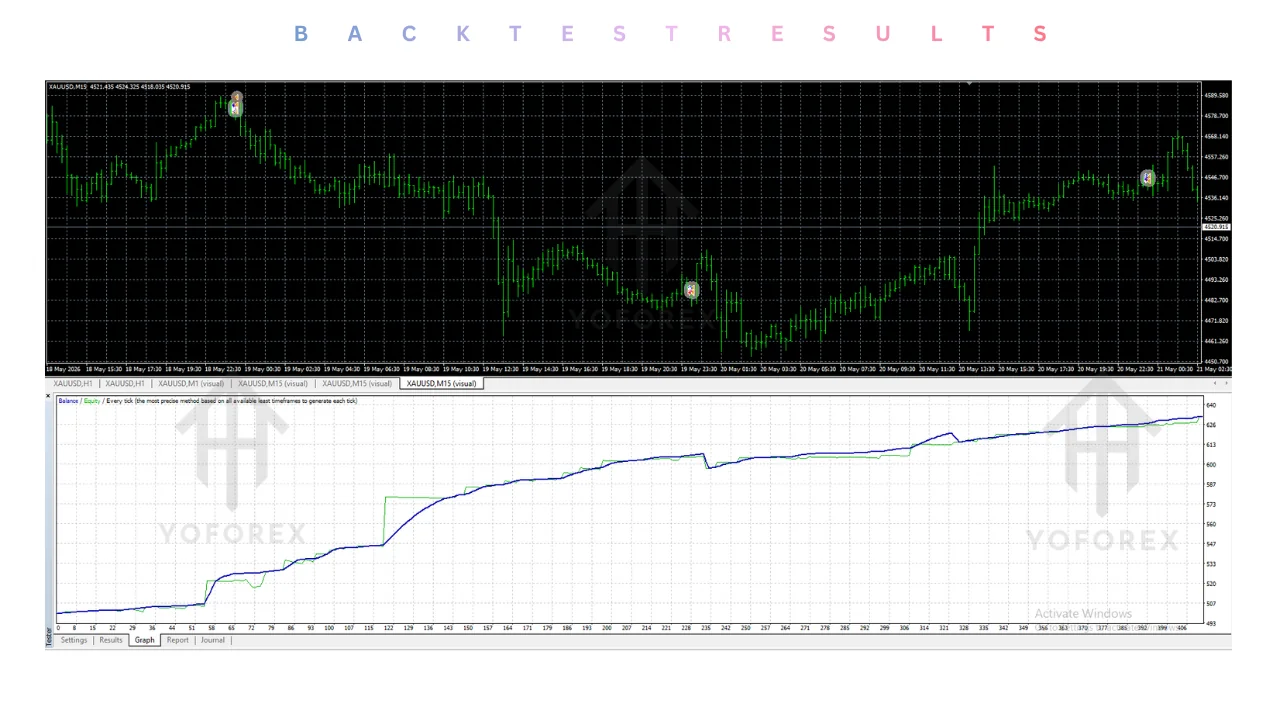
- Backtest availability and testing methodology (if provided).
- Demo testing process and support channels.
- Update policy and licensing terms.
- Pricing and any refund or trial options.
- Full product specifications on the Yoforexea site.
If any critical item is missing or unclear, request clarification before purchase.
How to Test CHOPPA Pro EA V16.0 Before Going Live
- Download and read the complete product specifications and manual.
- Confirm MT4, EURUSD, and multi-timeframe support.
- Install on a demo account with realistic spreads and leverage.
- Load documented or conservative settings.
- Run for a statistically meaningful period covering different market conditions.
- Review every trade: entry logic, exit quality, slippage, and correlation with intended multi-timeframe rules.
- Measure maximum drawdown and recovery behavior against your personal risk limits.
- Test broker conditions and connection stability.
- Only after the results satisfy your criteria consider a small live allocation.
- Continue monitoring and be prepared to intervene or disable the EA.
Never skip demo testing.
Is CHOPPA Pro EA V16.0 the Right Solution for You?
It may be a suitable candidate if your core problem is limited time for multi-timeframe EURUSD monitoring and you want an MT4 EA to handle the scanning and execution layer. It is less suitable if you need a different strategy, different pairs, guaranteed performance, or zero ongoing involvement.
Evaluate problem fit first, strategy match second, platform compatibility third, and your own risk tolerance and testing discipline last. Another EA or a hybrid manual-plus-alert approach may serve you better. The decision belongs to you after verification and testing.
Conclusion
If your main trading friction is the inability to monitor multiple timeframes on EURUSD consistently, CHOPPA Pro EA V16.0 MT4 by Yoforexea is a product worth evaluating. It directly targets automated multi-timeframe execution on that pair inside MT4. It does not eliminate risk, guarantee results, or remove the need for testing and oversight.
Verify every specification, run a disciplined demo period, and decide based on actual fit with your workflow and risk rules. That is the only reliable path from problem to informed purchase decision.
If CHOPPA Pro EA V16.0 matches your multi-timeframe EURUSD automation needs, review the full specifications on Yoforexea, confirm compatibility, install and test thoroughly on demo, then decide whether it belongs in your process. View the bot and check current details directly on the official site.
Support & Disclaimer
Support:
If you need help installing or configuring your EA, or face any kind of bug, feel free to reach out on:
Telegram Group: Join our community
Disclaimer:
Forex and gold trading involve risk. Past performance doesn’t guarantee future results. Always test robots on demo before live trading and use proper risk management.
REFERRAL
Join the VIP Signals Telegram Channel for real-time expert trading signals and stay ahead in the forex market. Get personalized strategies by becoming a part of our Real Account Management Telegram Channel and optimize your trading experience. If you’re aiming to Pass PropFirm Challenges , join our dedicated channel for tips and proven methods. Start managing your capital effectively with expert advice from our Funded Account Management Telegram Channel. For advanced traders, our HFT EA / Passing Telegram Channel offers high-frequency trading insights and strategies to boost your performance.
Sources
- CHOPPA Pro EA V16.0 MT4 / FREE DOWNLOAD — Yoforexorg
- CHOPPA Pro EA V16.0 MT4 / PRODUCT PAGE — Yoforex.net
- CHOPPA Pro EA V16.0 MT4 / YOFOREXEA — Yoforexea

