

If you’re tired of messy charts and signals that show up late (or vanish after the fact), Killbinary Signals Indicator MT4 aims to keep things simple: clean arrows, multi-timeframe confirmation, and smart alerts—all wrapped around a light dose of trend + structure logic. You get the clarity to act quickly, without turning your screen into a spaghetti bowl of lines.
This post covers what the indicator does, how it works, recommended presets for scalping/day/swing trading, and practical tips to help you deploy it safely. No gimmicks; just a sensible tool to help you read price and pull the trigger with more confidence.
What Is Killbinary Signals Indicator MT4?
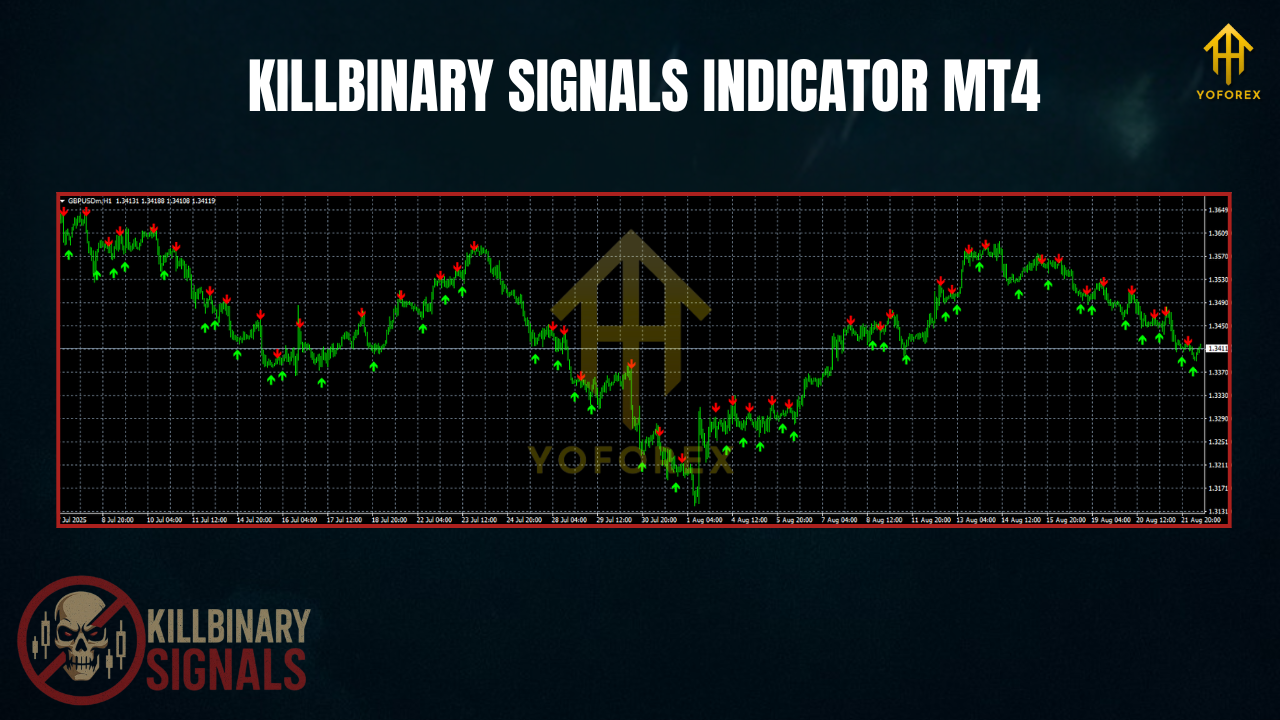
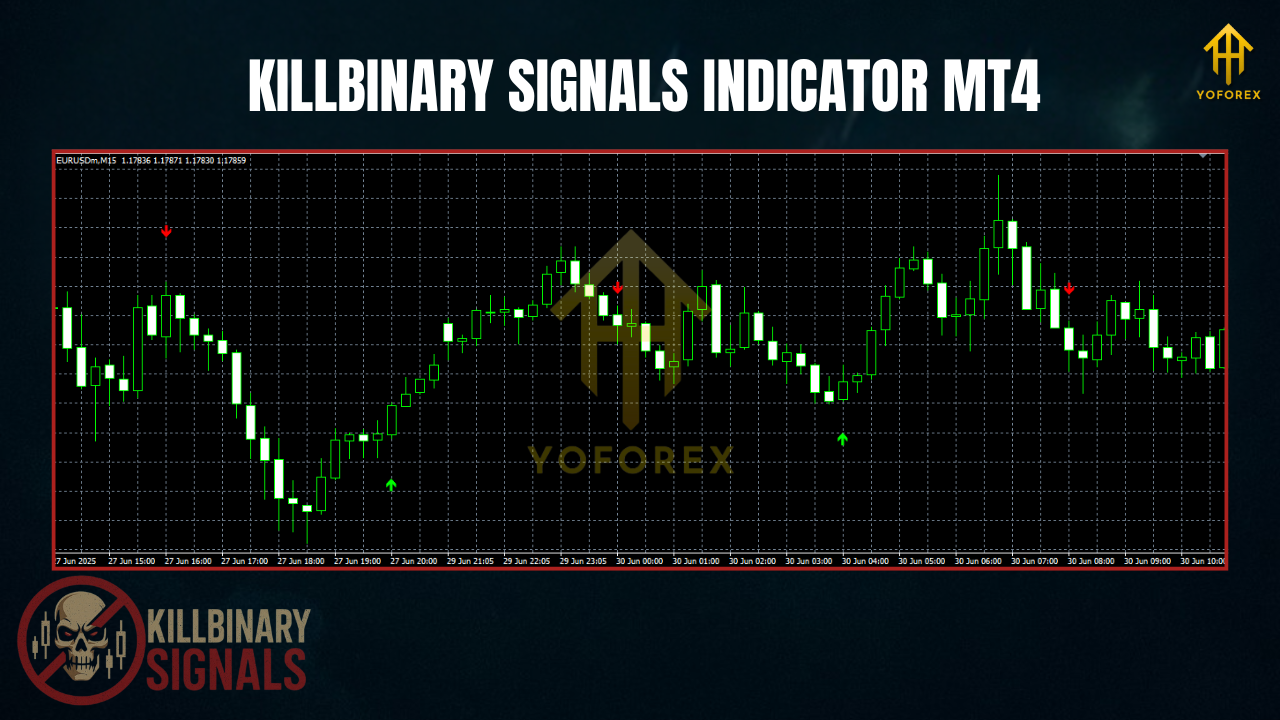
Killbinary Signals is a lightweight MetaTrader 4 indicator that produces buy/sell arrows and optional multi-timeframe (MTF) confirmation. It also supports alerts (popup, push, email) and can show dynamic support/resistance zones to frame entries, stops, and targets. It’s made for traders who want speed and clarity—whether you scalp on M5, day trade M15/H1, or ride H1/H4 swings.
- Platform: MT4
- Markets: Major FX pairs, XAUUSD (Gold), and broker-supported indices/crypto on MT4
- Timeframes: M1–H4 (popular: M5/M15 for scalps; M15/H1 for day trades; H1/H4 for swings)
- Skill Level: Beginner-friendly, pro-ready
Key Features (Why Traders Like It)
- Clean Arrow Signals: Easy long/short prompts you can see at a glance.
- MTF Confirmation: Align lower-TF entries with higher-TF bias (e.g., trade M15 with H1/H4 filter).
- Trend Bias Cue: Subtle MA/price-structure blend for directional context.
- Dynamic Support/Resistance: Optional zones for logical SL/TP planning.
- Smart Alerts: Popup, push, and/or email on signal/MTF alignment—no chart babysitting.
- Sensitivity Control: Tweak responsiveness to your style and symbol volatility.
- Low CPU Load: Runs smoothly on VPS and multi-chart setups.
- Confluence Friendly: Plays nicely with EMAs, pivots, and ATR-based stops.
How It Works (Plain English)
The indicator looks at momentum + structure to mark potential turns or continuation points. When momentum realigns with the prevailing trend bias—especially near dynamic S/R—you’ll see an arrow. Optionally, require higher-timeframe alignment for extra selectivity (fewer but cleaner signals). Your process becomes:
- Set Bias: Favor the trend direction shown by the bias cue and higher TF filter.
- Wait for Pullback/Setup: Price revisits a zone or consolidates.
- Act on Close: Enter on the candle close that prints the arrow with MTF alignment.
- Manage Risk: SL beyond structure; TP in R-multiples (partials and BE after 1R are common).
Suggested Settings & Presets
1) Scalping (M5–M15)
- Sensitivity: Medium–High (more signals; accept some noise)
- MTF Confirm: ON (trade M5/M15 with H1 bias)
- Alerts: Popup + push
- Stops/Targets: SL behind micro swing or ATR(14)×1.0; TP 1.2–1.8R; partials at nearest S/R
- Session: London open and London→NY overlap only
2) Day Trading (M15–H1)
- Sensitivity: Medium
- MTF Confirm: ON (H1/H4 bias)
- Alerts: Popup + email (for away-from-desk)
- Stops/Targets: SL ATR(14)×1.3; TP 1.5–2.5R; trail after 1R
- News: Pause near red-label events
3) Swing Trading (H1–H4)
- Sensitivity: Low–Medium (fewer, cleaner arrows)
- MTF Confirm: ON (D1 optional for context)
- Stops/Targets: SL ATR(14)×1.5; TP 2–4R; partials at weekly levels
- Tip: Avoid late-Friday entries; let runners breathe
Gold (XAUUSD) Tip: Gold is quick—bump smoothing a notch, widen stops slightly, and stick to liquid hours.
Two Simple Playbooks
A) Trend-Pullback Arrow (Beginner-Friendly)
- Confirm uptrend via bias + H1 alignment.
- Price pulls back to a Real-time S/R zone or EMA area.
- Enter long on the first bullish arrow that closes back with trend.
- SL: Below pullback low/zone; TP: 1st target prior high (1–1.5R), runner to next resistance (2R+).
- Move SL to BE at 1R; scale partials.
B) Break-Retest-Continuation (Intermediate)
- Trend bias up; price breaks a key zone with momentum.
- Wait for retest to hold; watch for bullish arrow on close.
- SL: Just past retest failure; TP: measured move or next HTF level.
- If MTF remains aligned and risk allows, consider a second add-on (advanced).
Installation & Setup (MT4)
- Download the indicator file (
.ex4/.mq4). - In MT4: File → Open Data Folder → MQL4 → Indicators → paste the file.
- Restart MT4 (or right-click Indicators → Refresh).
- Attach Killbinary Signals to your chart.
- In Inputs, configure:
- Sensitivity / Smoothing
- MTF_Confirm_TFs (e.g., Trading=M15; Confirm=H1/H4)
- Alerts (popup/push/email)
- Show_SupportResistance (true/false)
- Save a Template for one-click reuse across pairs/timeframes.
Best Practices & Risk Tips
- Wait for Close: Take arrows after the candle closes; intra-bar flickers can change.
- Trade Liquid Windows: London and NY overlap for majors; better spreads & cleaner fills.
- Confluence Wins: Arrow + zone + one filter (e.g., 100/200 EMA) generally outperforms naked signals.
- Keep Risk Small: 0.5–1% per trade; stop after 2–3 losses in a session.
- Journal Weekly: Track setup type, session, R:R, and notes; tweak one variable at a time.
- Avoid Major News: Spreads and slippage can blow past any indicator logic.
Pros & Cons
Pros
- Clear arrows with MTF guard rails
- Optional dynamic S/R for clean SL/TP planning
- Lightweight, VPS-friendly
- Beginner-friendly workflow; plays nice with price action
- Non-repaint on closed bars
Cons
- Over-sensitive settings can trigger in chop
- Intra-bar previews change; patience for bar close is required
- It’s an indicator, not an EA—execution and risk are on you
FAQs
Does Killbinary Signals repaint?
Signals are confirmed on candle close and don’t vanish afterward. Don’t enter off mid-bar previews.
Best pairs/timeframes to start?
EURUSD/GBPUSD on M15/H1 for cleaner behavior. Add XAUUSD after you calibrate risk.
Is it prop-firm friendly?
Yes—this is an indicator. Keep daily DD tight, follow your plan, and avoid high-impact news.
Can I use it on indices/crypto?
If your broker provides them on MT4. Increase smoothing and widen stops for higher volatility; always demo first.
Final Thoughts & Call to Action
If you’re after straightforward entries backed by higher-TF context and practical alerting, Killbinary Signals Indicator MT4 is a solid addition to your toolkit. Keep it simple: trade with bias, wait for the close, manage risk like clockwork. Collect 30–50 demo trades, then let your data guide small tweaks—coz consistency beats cleverness, every time.
Risk Disclaimer: Trading involves risk. Past performance doesn’t guarantee future results. Test thoroughly on a demo and never risk money you can’t afford to lose.