

Zig Zag Arrow Indicator V1.0 MQ4 – Complete Guide for Forex Traders
If you’ve been trading the forex market for a while, you probably know how messy price movements can get… candles shooting up, pulling back instantly, false breakouts everywhere. Many traders end up confused, coz they can’t clearly see where a trend starts or ends. And honestly, without clean structure, taking a trade is more of a gamble than trading logic.
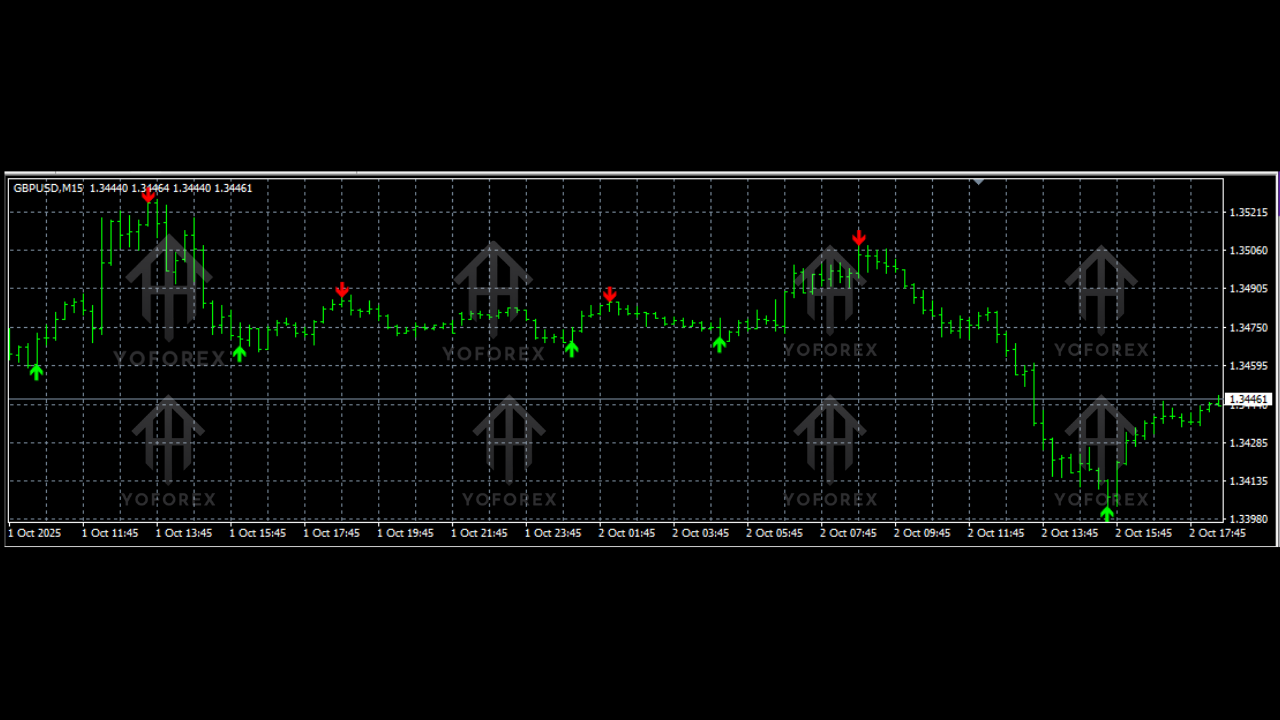
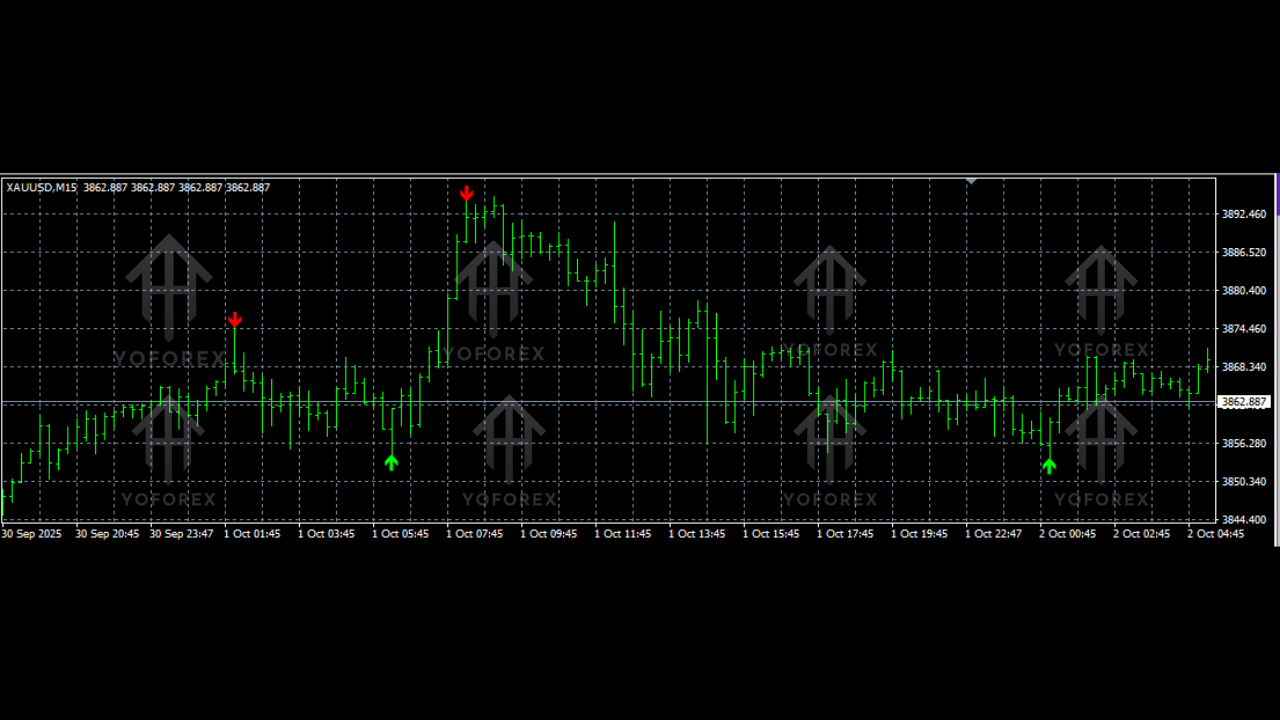
That’s exactly where the Zig Zag Arrow Indicator V1.0 MQ4 comes into play. It simplifies market structure by filtering out noise and marking only the meaningful highs and lows—plus it gives sharp arrows showing potential reversal points. No fancy complications, no overloaded charts—just pure clarity.
This guide breaks down everything you need to know about this indicator, from how it works to how you can use it for scalping, intraday trading, swing trading, or even smart trend confirmations.
What Is the Zig Zag Arrow Indicator V1.0 MQ4?
The Zig Zag Arrow Indicator is an advanced upgrade of the traditional ZigZag tool built into MT4. While the standard version plots only swing highs and lows, the V1.0 MQ4 version adds directional arrows, making it far more actionable for live trading.
Instead of showing every tiny retracement, the indicator highlights major market turning points. It tracks price swings and automatically prints arrows whenever it detects a strong reversal in momentum.
Traders rely on it because:
- It reduces chart noise.
- It exposes hidden market structure.
- It helps confirm trend direction.
- It assists in identifying potential entry and exit points.
This makes it perfect for beginners who want clean charts and for advanced traders who want an additional layer of confirmation.
How the Indicator Works Behind the Scenes
The indicator uses a combination of:
- Price deviation filters
- Swing high and swing low algorithms
- Reversal detection logic
When the price retraces beyond a certain threshold, the Zig Zag algorithm redraws the leg and signals a pivot. The arrow appears only when a significant swing is formed, helping traders avoid fake signals.
It does NOT repaint once the swing is confirmed, which is crucial for reliability.
Key Features of Zig Zag Arrow Indicator V1.0 MQ4
Here’s what makes this tool stand out:
- Accurate trend reversal arrows
- Non-repainting swing identification
- Works on all forex pairs
- Compatible with metals like XAUUSD
- Useful for scalping, intraday, or swing trading
- Super lightweight—doesn’t lag MT4
- Customizable sensitivity settings
- Filters out false retracements
- Helps define stop-loss levels based on swing points
- Ideal for structure-based strategies
You don’t need to be a chart expert. Even beginners can read the market better with it.
Why Traders Use This Indicator Daily
One of the biggest challenges in forex is knowing the real direction of the trend. Price often fakes moves before continuing its main direction. The Zig Zag Arrow Indicator helps traders by:
- Confirming trend direction visually
- Identifying top and bottom formations
- Supporting breakout and pullback strategies
- Simplifying Elliott Wave and structure reading
You’ll notice your chart instantly becomes cleaner and easier to interpret. The arrows help you stay patient and wait for proper setups instead of jumping into random candles.
Best Trading Strategies with Zig Zag Arrow Indicator
Below are some proven trading approaches you can use.
1. Reversal Arrow Strategy
Whenever the indicator prints a reversal arrow:
- Check if it's at a swing high or swing low.
- Confirm with another tool like RSI or MA.
- Enter in the direction of the arrow if conditions align.
This is great for scalping and intraday moves.
2. Trend Continuation Setup
Often after an arrow prints, the trend begins forming new higher highs or lower lows. Traders wait for:
- A pullback toward the last swing
- A new arrow confirming the continuation
This increases accuracy significantly.
3. Support and Resistance Breakout Strategy
The indicator helps identify structural levels. Then:
- Draw your support/resistance based on swings
- Wait for a breakout
- Use the arrow for confirmation before entering
This reduces fake breakout losses.
How to Install Zig Zag Arrow Indicator V1.0 MQ4
Installation is simple:
Step 1: Download the indicator file
You’ll receive a file ending in .mq4 or .ex4.
Step 2: Open MT4
Go to
File → Open Data Folder
Step 3: Navigate to Indicators folder
MQL4 → Indicators
Step 4: Paste the indicator file
Step 5: Restart MT4
Step 6: Open the Navigator panel
Find Zig Zag Arrow Indicator V1.0 and attach it to any chart.
You’ll see arrows and swing lines appear immediately.
Best Settings for the Indicator
Although default settings work for most traders, you can adjust:
- Deviation
- Backstep
- Depth
Higher deviation = fewer signals, better accuracy
Lower deviation = more signals, aggressive trading
For beginners, keep it default to avoid over-filtering.
Timeframes & Pair Compatibility
This indicator works on:
- M1 to H4 (scalpers and intraday)
- D1 charts (swing trading)
- Forex pairs
- Gold and Silver (XAUUSD / XAGUSD)
- Indices
- Crypto charts on MT4 brokers
It is flexible enough to adapt to any market.
Live Market Example – How Traders Use It
Imagine EURUSD forming lower lows and lower highs. Suddenly, the indicator prints a bullish arrow at a major swing low.
- Price then breaks the previous lower high
- A new bullish structure forms
- A second arrow confirms momentum
A trader enters long confidently because the indicator confirmed a real trend shift—not just a minor pullback.
This type of accuracy is why many traders use it daily.
Who Should Use the Zig Zag Arrow Indicator?
It’s designed for:
- New traders wanting clean charts
- Scalpers looking for quick entries
- Swing traders needing reversal zones
- Structure traders following HH/HL patterns
- Anyone practicing Elliott Wave
- Price action traders wanting pivot clarity
It doesn’t give automatic buy/sell orders, but it helps YOU make clearer decisions.
Pros and Cons
Pros
- Easy to understand
- Cleans up chart noise
- Useful across all timeframes
- Accurate swing mapping
- Identifies clear reversal points
Cons
– Arrows form only after swing confirmation
– Not a standalone system; needs basic analysis alongside
Final Thoughts
The Zig Zag Arrow Indicator V1.0 MQ4 is one of those must-have tools if you want to read market structure properly. It gives clarity, reduces confusion, and provides clean reversal arrows that help you time your trades better. Whether you're a beginner or experienced trader, this tool can seriously improve your decision-making.