Introduction
Trading highly volatile Forex pairs like GBPUSD on the M5 timeframe can feel like riding a roller coaster—thrilling, but risky. If you’re tired of manual monitoring, second-guessing entries, and worrying about runaway drawdowns, you’ll appreciate what Pumperbot M5 EA brings to the table. This free MetaTrader 4 Expert Advisor combines a time-tested grid trading strategy with an AI brain trained on thousands of hours of historical data. The result? A hands-off, adaptive grid trading robot that hunts for high-probability reversal zones and dynamically adjusts its order grid to current volatility. In this post, we’ll dive into how Pumperbot M5 EA works, explore its standout features, and walk you through recommended settings so you can get started on a demo or live ECN/RAW account today.
How Pumperbot M5 EA Works
- AI-Driven Market Analysis
At its core, Pumperbot M5 EA uses a proprietary artificial intelligence model to scan price action on the M5 timeframe. This on-board AI learned from thousands of backtests, learning to identify subtle market rhythms and potential reversal zones before human eyes spot them. - Signal Generation
When the AI flags a high-probability rollback area, Pumperbot M5 EA triggers its grid logic. Unlike fixed grid bots, it doesn’t blindly ladder orders. Instead, it calculates a smart step size that adapts to current market volatility—tighter grids in calm markets, wider spacing when volatility spikes. - Dynamic Grid Construction
Upon signal confirmation, the robot constructs a series of pending buy or sell orders around the trigger price. This dynamic grid balances average entry price with optimal spacing, aiming to capture a profitable move when price reverts. - Automated Exit & Momentum Shift Detection
The grid closes in two ways: either when a preset profit target is reached or when the AI detects a shift in momentum that invalidates the original reversal thesis. That second option prevents chasing the market when conditions change unexpectedly. - Built-In Safeguards
Pumperbot M5 EA enforces maximum lot sizes, limits the number of simultaneously open orders, and applies both per-trade stop loss and total drawdown caps. These protective algorithms are crucial for preserving capital during extended trends against the grid direction.
Key Features of Pumperbot M5 EA
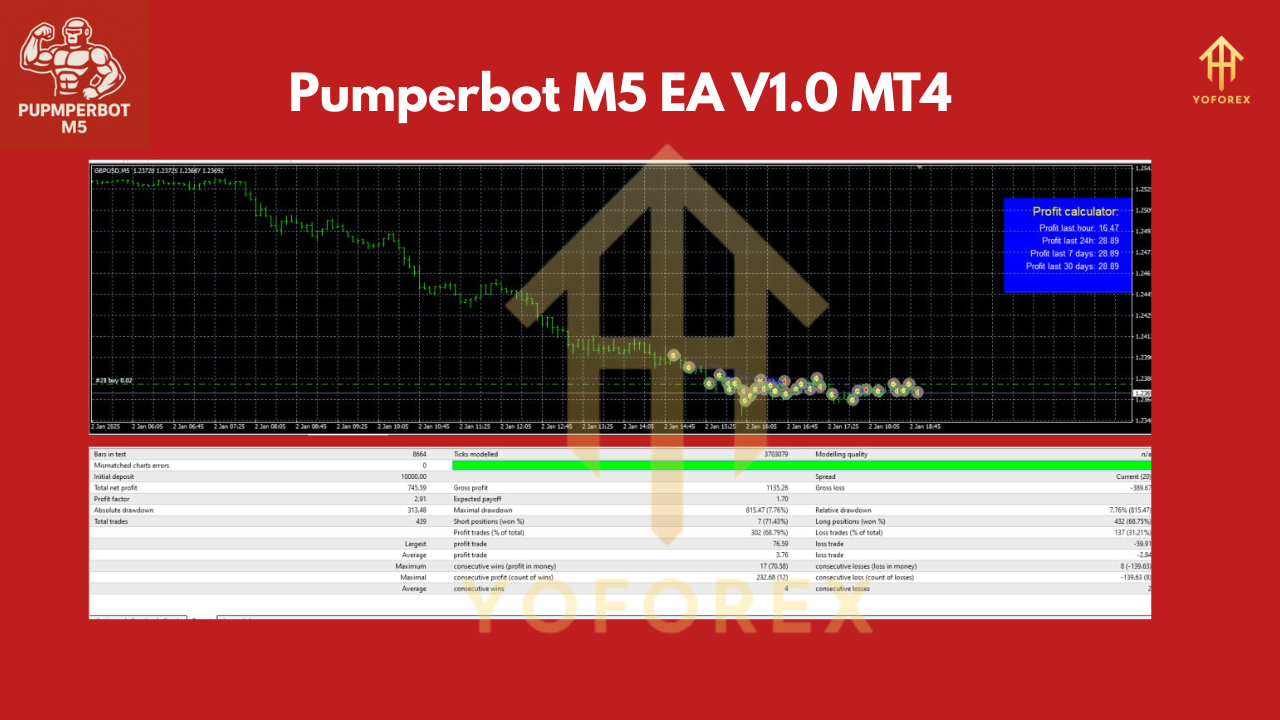
• AI-Enhanced Grid Trading – Combines grid strategy with machine learning signals.
• Adaptive Grid Spacing – Automatically adjusts order intervals based on current volatility.
• Reversal Zone Detection – Pinpoints high-probability pullback levels on M5 timeframe.
• Automatic Grid Closure – Closes entire grid at profit target or upon AI momentum signal.
• Risk Management Controls – Limits on total drawdown, max lots, and open orders.
• 24/7 Operation – Designed to run continuously on a VPS for round-the-clock trading.
• Optimized for GBPUSD & EURUSD – Best performance on major, highly liquid pairs.
• ECN/RAW Account Friendly – Works with tight-spread accounts to maximize profit.
Recommended Settings & Installation
- Download & Install
- Grab the free EA file from YoForex EA Downloads
- Copy
Pumperbot_M5_EA.ex4into your MT4 “Experts” folder. - Restart MetaTrader 4.
- Attach to Chart
- Open a GBPUSD M5 chart.
- Drag “Pumperbot M5 EA V1.0” onto the chart.
- In the Inputs tab, verify the settings below.
- Input Parameters
LotSize= 0.01 (adjust per account size)MaxOrders= 5GridStepMultiplier= 1.2ProfitTargetPips= 20MaxDrawdownPercent= 5EnableAISignals= true
- VPS & Time Settings
- Ensure your VPS clock is synced to GMT.
- Set
TradingStartHour= 0,TradingEndHour= 24 for full-time operation.
- Demo First
Always run Pumperbot M5 EA on a demo account for at least two weeks to verify performance under your broker’s conditions.
Why Choose Pumperbot M5 EA?
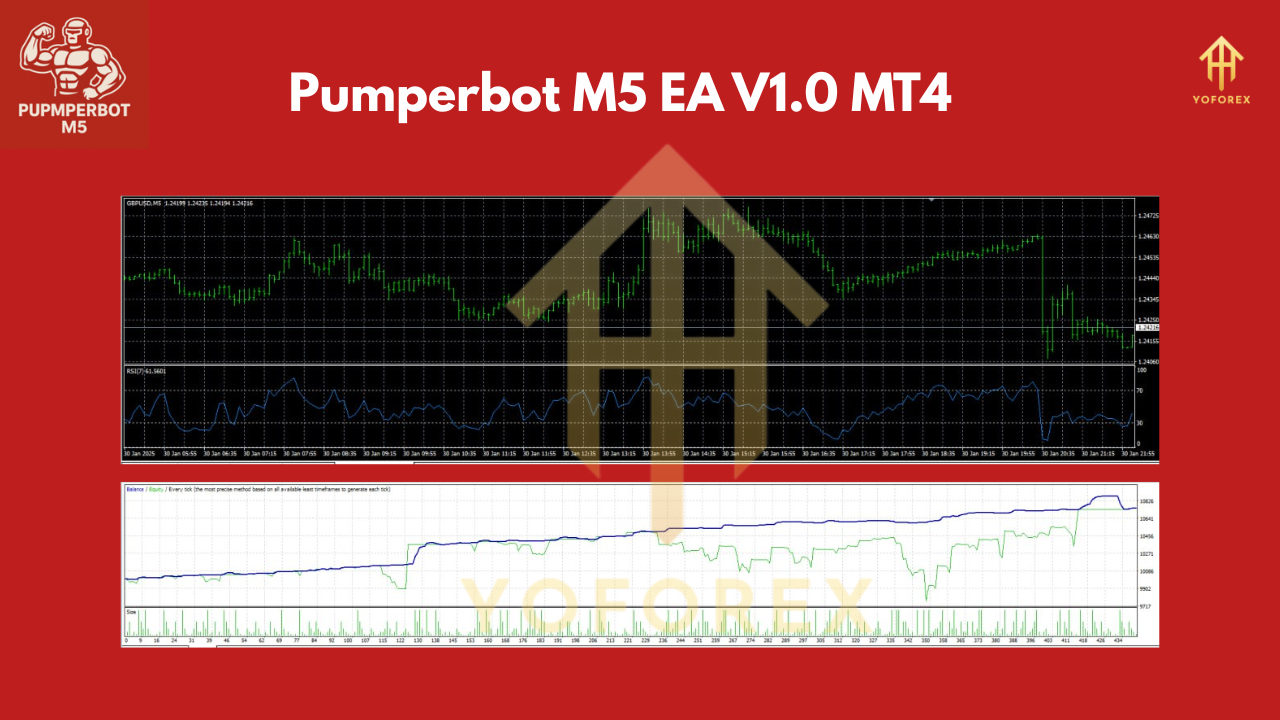
Unlike one-size-fits-all grid bots, Pumperbot M5 EA leverages AI to know when the odds are in your favor. The dynamic grid spacing adapts to real-time volatility, reducing the risk of disastrous drawdowns during major news events. On top of that, the free, regularly updated package from YoForex comes with expert support and community feedback—so you’re never left trading blind.
Risk Management & Best Practices
- Start Small: With recommended deposit of $100 or $1000, tailor your lot size accordingly.
- Spread Awareness: Use ECN/RAW accounts to keep spreads low; wide spreads eat into grid profits.
- VPS Stability: A reliable VPS minimizes slippage and order execution delays.
- Demo Testing: Always validate in demo before going live.
Conclusion & Call to Action
Ready to automate your M5 grid trades with cutting-edge AI? Download Pumperbot M5 EA V1.0 MT4 now from YoForex EA Downloads and unleash dynamic grid trading on GBPUSD like never before. Need help or ran into a bug? Ping our support via WhatsApp or join the community on Telegram.
Trade responsibly, demo before live, and let Pumperbot power your next Forex breakthrough.
Join our Telegram for the latest updates and support
Happy Trading

Comments
Leave a Comment